Getting started
Mod Profile
To avoid messing with your normal Void Crew profile while using or testing mods, you can use a separate Void Crew mod profile.
You can enable the mod profile by adding the following launch option to Void Crew on Steam:
-mods-profile
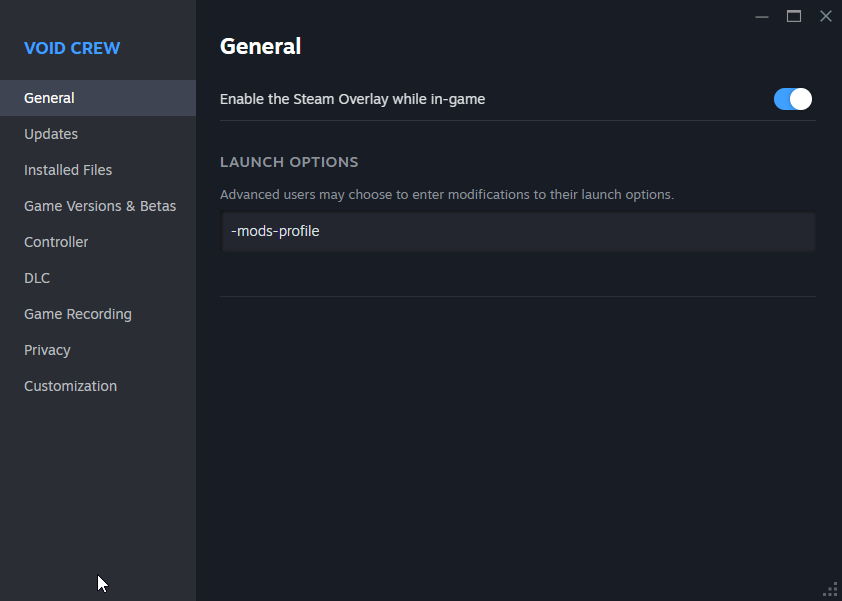
Automated switching to modded profile to be implemented later.
Mod Manager
It’s important to know how mods are installed for Void Crew before you get started.
Void Crew Mods are primarily distributed via Thunderstore
Installing Unity
You will need to install Unity in order to create custom assets and export them in a format that Void Crew can load. We recommend using the same version as Void Crew, which currently uses Unity Editor 2022.3.62f2.
Installing Git
We highly recommend using Git while developing mods. If you already use Git, you can skip this chapter.
Git is a version control system. It keeps track of changes you make to files, allowing you to:
Roll back to a previous working version if something breaks
See exactly what changed in your code
Experiment safely without losing your work
For example, if you made a change and it causes your mod to stop working, Git lets you restore your project to an earlier state easily and helps you identify which change caused the problem.
Git also makes it easy to download and update external resources such as:
Do I need GitHub?
No, Git works entirely on your computer. GitHub is an online hosting/publishing service for Git Repositories. You do not need to upload your project anywhere, unless you want to:
Collaborate with others
Share your source code
Publish your project as open source
For many, Git will simply act as a local backup and version history system.
Git Client
There are many options for Git clients available, installing most will also install Git itself on your system.
Suggested Git Clients:
GitHub Desktop (free)
Sourcetree (free)
GitKraken (free for public repositories)
Fork (free for evaluation)
Setting up the Void Crew Samples Project
Next, you will want to setup a clone of the Void Crew Samples Project. The project includes useful samples for getting started, and already includes the Void Crew Common Library.
Use your chosen Git client to clone the void_crew_mods_sample repository. If you are not using a Git client, you can download it directly from Github.
In Unity Hub, press “Add” and select the folder containing the Void Crew Samples Project
Other Tools
3D Assets
If you plan on including new 3D assets in your Mod, we recommend installing Blender. Blender will allow you to create custom 3D assets for free.
It is also possible you will be using 3D assets made by others found on the internet. In that case Blender will also be a useful tool for modifying those assets, or converting them to FBX format for use in Unity.
You can find example 3D assets in the samples project. This also includes simple scale models, so you can make the models fit neatly into our various socket shapes in the game.
Images and Sprites
If you’re making new 3D assets you’ll likely also need to create new textures and sprites for UI icons. Some free editors include: Paint.Net, GIMP and Krita